
From job criteria to ranked shortlist — in one structured hiring workflow
JD Align helps recruiters move from role criteria to ranked shortlist, with explainable candidate ranking, structured review, and assessments when extra evidence is needed.
Hiring Workflow manages the shortlist process. QuickPacks adds structured assessments when extra candidate evidence is needed.
No credit card required. Start with 20 free evaluations.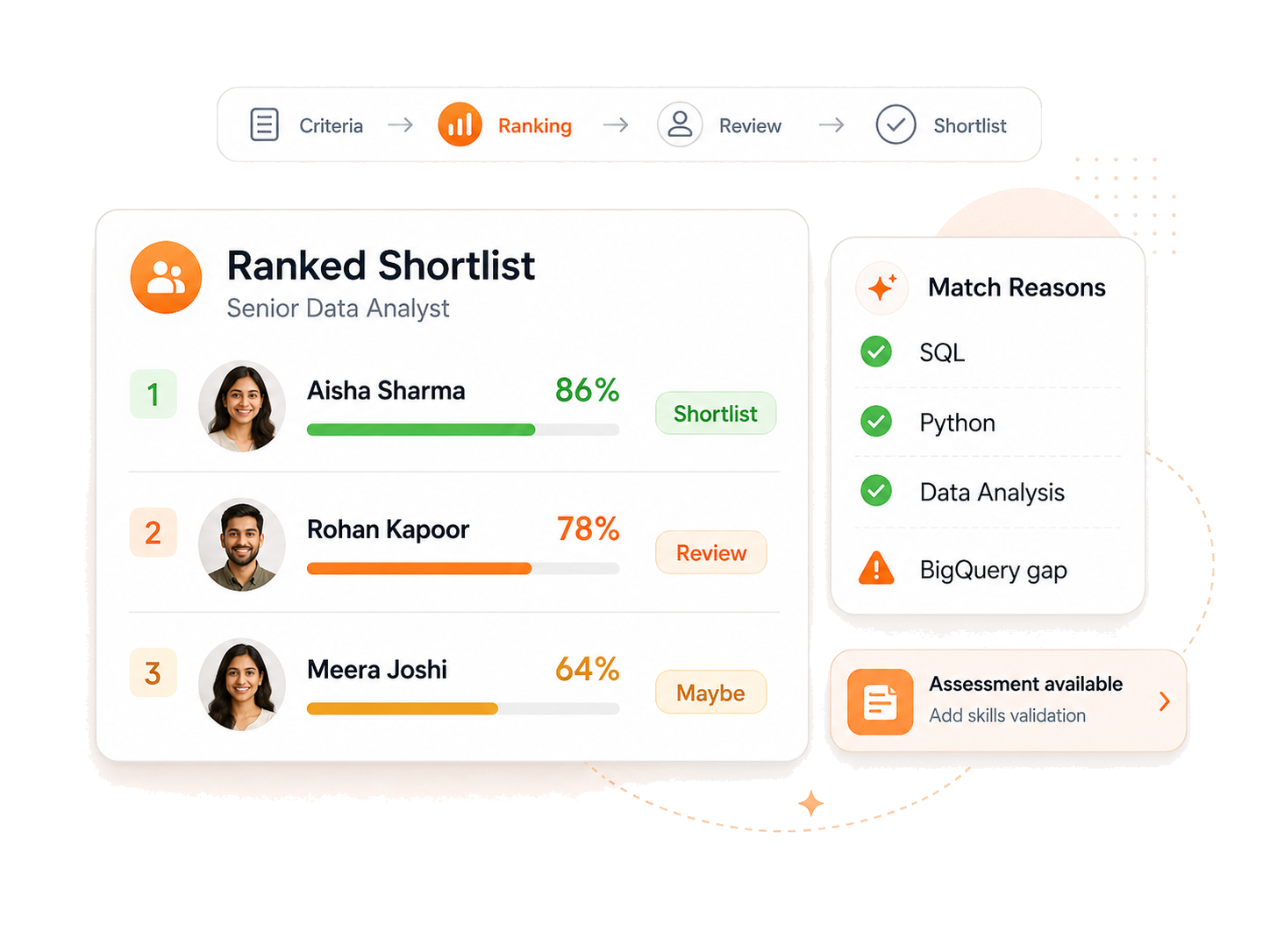
JD Align hiring workflow and QuickPacks
Hiring Workflow
Structured hiring workflow for ranked shortlists.
Define what good looks like, collect applications, rank candidates consistently, and move stronger matches into a shortlist with evidence visible to the recruiter.
Use Hiring Workflow when you need to:
Review many applicants consistently
Rank candidates before manual review
Explain why candidates match or miss criteria
Share shortlist evidence with stakeholders
What Hiring Workflow gives you
Role criteria setup
Define required skills, preferred skills, weighting, and screening settings.
Public job page
Publish or pause a role page and control whether candidates can apply.
Automatic candidate ranking
Applications are scored against the job criteria as they arrive.
Evidence-based review
See match reasons, missing criteria, and candidate-specific evidence.
Shortlist status management
Move candidates through review statuses by job.
Exports for hiring teams
Export ranked shortlists and top resumes for review or sharing.
How JD Align works
Define the role
Set required skills, preferred skills, weighting, and screening settings.
Collect candidates
Publish a job page or add candidates from your existing sourcing channels.
Rank applicants
JD Align scores candidates against the role criteria and shows stronger matches first.
Review evidence
See match reasons, gaps, and candidate details before making shortlist decisions.
Add assessments when needed
Use QuickPacks for interview guides, quizzes, or cognitive tests.
Shortlist and export
Move candidates through statuses and export the ranked shortlist.
QuickPacks
Create, send, and run structured candidate assessments in minutes.
Generate interview guides, technical quizzes, or cognitive tests when a shortlist needs extra evidence before final review.
Use QuickPacks when you need to:
Add assessment evidence before final shortlist decisions
Send structured quizzes or cognitive tests
Compare candidate responses consistently
Share printable outputs with interview panels
What QuickPacks gives you
Interview pack generation
Create structured interview questions, probes, score anchors, and red flags from the job context.
Technical quiz packs
Generate job-based quiz questions with candidate-ready wording and answer explanations.
Cognitive test options
Add role-agnostic reasoning checks when resumes need extra supporting evidence.
Candidate access and tracking
Send secure access links and track completion, scores, and outputs for recruiter review.
Printable panel outputs
Share clean pack or quiz output with hiring managers and interview panels.
Three packs, three hiring moments
Pick the assessment type that fits the evidence gap in your shortlist.
Product links are available after sign in. Use any JD Align account, including a free account, to open Interview Pack, Quiz Pack, and Cognitive Test tools.
Interview Pack
Best for: structured panel interviews and hiring-manager review. Includes: role-specific questions, probes, score anchors, red flags, and printable panel output.
Quiz Pack
Best for: technical screening with comparable candidate-ready questions. Includes: job-based questions, automatic scoring, answer explanations, invitations, and completion tracking.
Cognitive Test
Best for: role-agnostic reasoning checks before or alongside shortlist review. Includes: verbal, numerical, logical, and abstract reasoning, timed sessions, and secure result tracking.
How QuickPacks works
Paste the job description
Add role context so the pack reflects the work and hiring stage.
Choose a pack
Select Interview Pack, Quiz Pack, or Cognitive Test.
Send to candidates
Use secure candidate links or printable panel outputs.
Review results
Track completion, scores, and outputs for hiring-team discussion.
Learn more about JD Align
Learn more about structured assessments
Explore guides and generators for interview packs, technical quizzes, cognitive tests, and structured hiring.